

SAS vs SATA Hard Drives: Why a SAS Drive Needs an HBA Card (and Which One to Buy)
Published: November 25, 2026
The short answer
A SAS drive won’t plug into a normal PC or a ready-made home NAS. It needs a SAS controller, which for a home server means an HBA card in a spare PCIe slot plus the right cables. With those, a SAS drive works just like any other drive, and the same card runs SATA drives too.
That matters because SAS drives are often the cheapest per terabyte, especially used ones pulled from data centres. Sort any store by price per TB and you’ll see them near the top. In my tables they carry a small “SAS · needs HBA” note so you don’t buy one by accident.
How to tell a SAS drive from a SATA drive
From the front, SAS and SATA drives look identical. The difference is on the back edge, where the cables plug in.
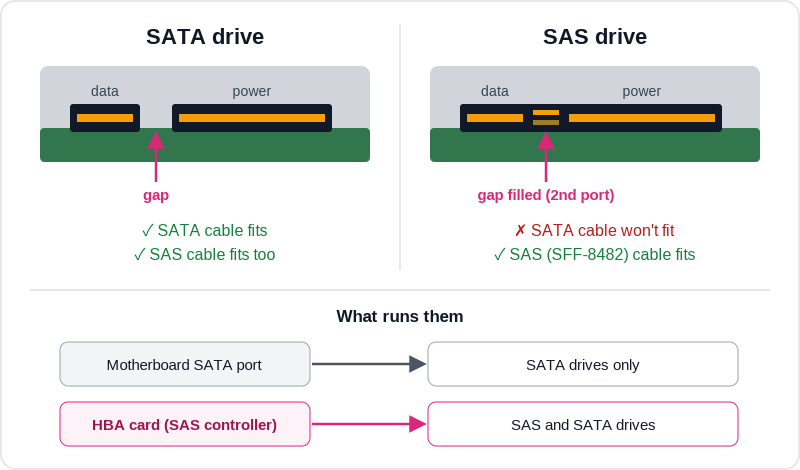
- SATA drive: a small data connector, a gap, then the wider power connector.
- SAS drive: one long connector with no gap. The bridge in the middle carries a second data port, which servers use as a backup path to the drive.
- The listing: the title or spec sheet usually says “SAS”, “SAS 6Gb/s” or “SAS 12Gb/s”. Watch out for model numbers that differ by one digit: Seagate’s ST4000NM0023 is SAS while ST4000NM0033 is SATA, and Toshiba MG drives with SCA in the model (such as MG03SCA300) are SAS while ACA ones are SATA. If a listing doesn’t say, ask the seller before you buy.
It only works one way round. A SATA drive plugs into a SAS controller and works. A SAS drive does not work on a SATA port, even with an adapter, because the motherboard’s SATA controller can’t talk to it.
Why bother with SAS at all?
Because they’re cheap. Companies retire SAS drives by the shelf-load, and they turn up on eBay for much less per terabyte than the same size in SATA. Have a look at the SAS hard drives listed right now and compare them with SATA.
The other points in their favour:
- Built for servers. SAS drives are enterprise drives, rated for running 24/7. Enterprise vs consumer drives for a NAS covers what that’s worth.
- Power is about the same. A 7200rpm SAS drive draws about what a 7200rpm SATA drive does. Most of the extra electricity goes to the card (below), not the drives. How much power a hard drive uses has the per-drive numbers.
The catch is that you need a computer with a free PCIe slot. That means a DIY server or an old desktop running Unraid, TrueNAS or Proxmox, not a Synology or QNAP box. If you’re still choosing, DIY NAS vs a pre-built Synology walks through it.
What an HBA card is
An HBA (host bus adapter) is a PCIe card that adds SAS ports to your computer. Each port on the card fans out to four drives, so the common 8i cards (8 internal lanes, two ports) run eight drives.
Three things to get right:
- IT mode. HBAs come with one of two firmware types. IT mode passes every drive straight to the operating system, which is what Unraid, TrueNAS/ZFS and Proxmox want. IR mode does hardware RAID and hides the drives behind it. Buy a card sold as “IT mode” or “flashed to IT mode” and you won’t have to flash it yourself.
- The slot. These are PCIe x8 cards. They work in any x8 or x16 slot, and in an x16 slot that only runs at x4 speed, which is still plenty for hard drives.
- The cables. The card end depends on the card: the 9207-8i has SFF-8087 (Mini-SAS) ports and the newer 9300-8i has smaller SFF-8643 (Mini-SAS HD) ports. The drive end is the same either way: you need cables ending in 4× SFF-8482, which have the SAS plug on each drive end and a SATA power lead for each one. SFF-8482 plugs fit SATA drives as well, so one cable type works for both. Ordinary “to 4× SATA” breakout cables won’t fit SAS drives.
If your case has a backplane or you’re adding a disk shelf, you need different cables (or an “8e” card with external ports), so check what your backplane takes first.
The cards I’d buy
The LSI 9207-8i is the card I’d buy for SAS drives in a home server. It’s the one homelab forums recommend over and over: PCIe 3.0, eight drives, and fast enough for any number of spinning drives. The newer 9300-8i does the same job just as well. Its extra speed only matters for SAS SSDs, it runs a little warmer, and it’s the one most European Amazon stores have in stock.
These cards come and go on Amazon, so I only show the picks your country’s Amazon store had in stock when I last checked. The kits come with the cables, so there’s nothing else to buy.
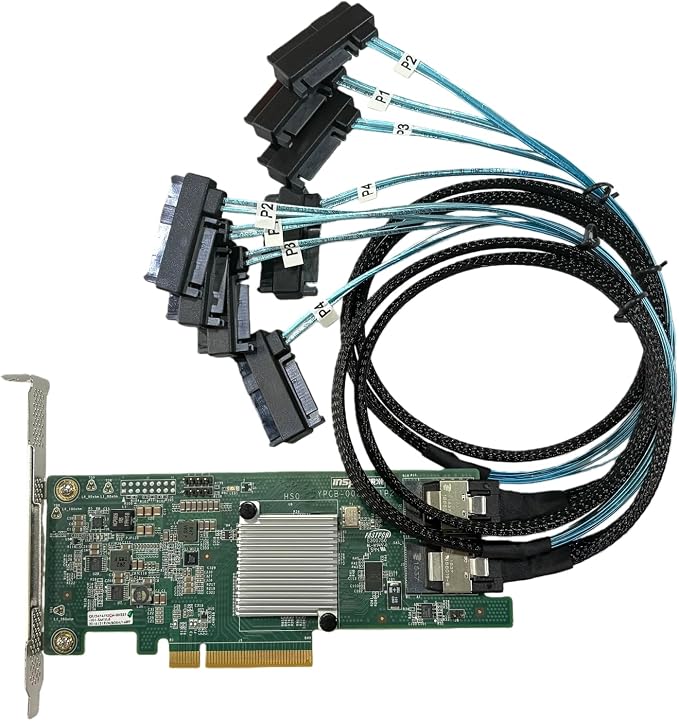
The card most home-server builders use for SAS drives: LSI SAS2308 chip, PCIe 3.0 x8, already flashed to IT mode (P20 firmware) so Unraid, TrueNAS and Proxmox see every drive directly. Two SFF-8087 to SFF-8482 cables come in the box, so it runs up to 8 SAS or SATA drives with nothing else to buy.
See it on Amazon →
The newer 12Gb/s card on the Broadcom SAS3008 chip, PCIe 3.0 x8, sold in IT mode for Unraid, TrueNAS and Proxmox. Two SFF-8643 to SFF-8482 cables come in the box, so it runs up to 8 SAS or SATA drives. It runs a little warmer than the 9207-8i and is the kit most European Amazon stores have in stock.
See it on Amazon →
The 9207-8i in Broadcom/LSI retail packaging, with many more reviews behind it, and sold in every Amazon store I cover. Card only: add one SFF-8087 to SFF-8482 cable (below) for every four drives.
See it on Amazon →The cables
Skip this if you buy a kit above, which already has two in the box. For a card-only purchase, you need one cable for every four drives. Match the card end to your card’s ports: SFF-8087 for the 9207-8i, SFF-8643 for the 9300-8i.

For cards with SFF-8087 ports, like the 9207-8i. One cable runs four drives. The SFF-8482 plugs fit SAS and SATA drives alike, and each one takes power from an ordinary SATA power lead from your PSU.
See it on Amazon →
The same job for cards with the newer SFF-8643 ports, like the 9300-8i. One cable runs four SAS or SATA drives.
See it on Amazon →Before you buy: things worth knowing
- Keep it cool. These cards were built for servers with loud fans blowing over them. In a quiet home case the heatsink can get very hot, so point a case fan at it or zip-tie a small 40mm fan onto the heatsink.
- Power. Broadcom rates the 9207-8i at about 10 W. On some systems it also keeps the processor out of its deepest idle states, so the whole machine may draw a few watts more. That’s roughly the cost of running one or two extra drives.
- Spin-down. SAS drives use different commands to spin down than SATA drives. On Unraid you need the community “SAS Spindown” plugin. If spinning drives down to save power matters to you, check your OS supports it for SAS first.
- Used drives from storage arrays. Drives pulled from NetApp and EMC systems are often formatted with 520-byte sectors and won’t show up as usable disks. The fix is a one-off reformat to 512 bytes through the HBA with
sg_format --format --size=512(from sg3_utils). It can take several hours per drive and erases everything on it. - Fake and unflashed cards. Cheap “LSI” cards vary in quality, and some sold as “IT mode” aren’t. Buy from a listing with plenty of reviews, keep the returns window open, and check the firmware when it arrives.
- Test used drives on arrival. Run a SMART check and a full surface test before trusting a used SAS drive with data. I went through the whole process for a used enterprise drive in my eBay to Unraid walkthrough.
Quick checklist
- My machine has a free PCIe x8 or x16 slot (not a Synology/QNAP box)
- HBA card sold in IT mode (9207-8i or 9300-8i)
- One cable to 4× SFF-8482 per four drives (SFF-8087 or SFF-8643 at the card end), unless the kit includes them
- A spare SATA power lead for each drive
- A fan pointed at the card’s heatsink
- Used drive? Check it isn’t 520-byte formatted, then test it before trusting it
Once that’s sorted, the cheapest drives in the table are fair game. Compare SAS drive prices now.
